Send us your favorite photo and we’ll pre-print your card and have it ready for pickup at your convenience. Submitting a photo is quick and easy! Click the button below and sign into your myUMBC account. Look for Upload ID Photo in the Quick Links menu.
Follow the on screen instructions to submit your photo. Please allow 1-3 business days for photo processing. You will be notified via email when your photo has been approved or rejected. Please contact the UMBC Retriever Card Center online or by phone at 443-612-2273 with any questions or concerns regarding the upload process. Images of your government-issued photo ID will be stored on a secure server until our staff has reviewed your submission. Once your submission is processed, the image of your government-issued photo ID will be purged and is no longer accessible.
Acceptable Photo Samples:
Similar to a passport photo, your photo should be a recent photo taken straight-on against a plain white, off-white, or lightly colored background with eyes looking directly at the camera. The photo is taken from the shoulders up with some blank space between the top of the head and the top edge of the photo.

No additional persons or items in the photo.

No glare, watermarks, special effects, or photo filters present.
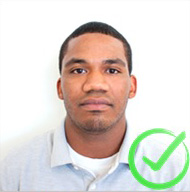
Photo contrast and coloring is not altered.
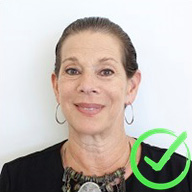
Photo is not blurry, grainy, or low-quality.
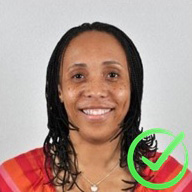
Good contrast between the subject and the background.

Unacceptable Photo Samples:
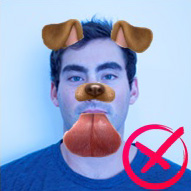
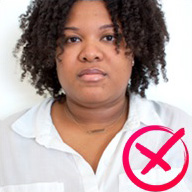


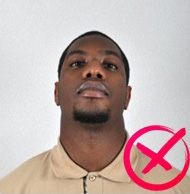

Photo Guidelines
- This picture is for identification purposes. The picture must clearly identify your person. No hats, sunglasses, camera flash reflections, red-eye, lens flares, filters, animals, props, additional persons, and jewelry or garments that obstruct a clear view of the face. Must be a recent photo (taken within 1 year)
- The photo must be in color and taken against a solid white, off-white, or lightly colored background
- Photo must be from the top of the shoulders to the top of the head with some blank space above the head and the top edge of the photo (similar to a passport photo).
- Photo must be straight-on and with eyes looking directly at the camera (no profile or angled pictures).
- JPEG format only; maximum file size is 2048 KB
- Image Height & Width: 400 PX (min), 900 PX (max)
- Image Resolution: 72 DPI (min), 300 DPI (max)
Resize your photo, if needed, prior to submission
The Retriever Card Center reserves the right to reject any photo submitted that is not in compliance with these guidelines. A valid government-issued photo ID is required to receive your Retriever Card. Retriever Card Center staff may require a photo to be retaken in-office should the electronically submitted photo not be an accurate representation of the cardholder. By proceeding with an electronic photo upload, you acknowledge that you are submitting an authentic image of yourself. Uploading an image of any other individual constitutes a direct violation of the Retriever Card Terms & Conditions. Any such instance will result in an immediate referral to the Office of Student Conduct and Community Standards.